

The core difference between Network Attached Storage (NAS) and a Storage Area Network (SAN) comes down to a simple question: does your business need to share files, or does it need raw performance for critical applications? A NAS is a self-contained storage device that connects to your office network, acting as a central file server for easy team access.
In contrast, a SAN is a dedicated, high-speed network of storage devices that your servers treat as local hard drives. It is purpose-built for demanding, transaction-heavy applications like databases or large-scale virtualization, where speed and reliability are paramount to business operations. Understanding this distinction is the first step in making a sound investment in your IT infrastructure.
What Is The Difference Between NAS and SAN?
Evaluating storage solutions isn't about which is "better," but which architecture is the right fit for your specific business needs, risk profile, and long-term goals. Understanding how they fundamentally operate is crucial for making an informed decision that supports your company's objectives.
Think of a Network Attached Storage (NAS) device as a specialized file server. It connects directly to your existing office network—typically with a standard Ethernet cable—providing a central location for storing and sharing files. Its simplicity and lower upfront cost make it a practical choice for many small and midsize businesses focused on collaboration and data consolidation.
A Storage Area Network (SAN) is fundamentally different. It is a separate, dedicated network built exclusively for high-speed data traffic between servers and storage arrays. A SAN presents storage to servers as raw blocks of data, making the server believe the storage is a locally attached drive. This architecture delivers the high-speed, low-latency performance required for databases, virtual machine environments, and other input/output (I/O) intensive applications.
This distinction is reflected in market trends. According to research on Canadian data centre storage trends, SANs have long held a dominant market share due to their role in high-performance sectors like finance and healthcare. Concurrently, the NAS market is poised for significant growth as more businesses seek simple, effective solutions for file collaboration.
To clarify the core differences, consider this high-level comparison.
NAS vs. SAN at a Glance
This table offers a summary to help you see the key differentiators at a glance.
| Attribute | Network Attached Storage (NAS) | Storage Area Network (SAN) |
|---|---|---|
| Data Access | File-level (serves whole files) | Block-level (serves data blocks) |
| Network Type | Uses the existing LAN (Ethernet) | Requires a dedicated network (Fibre Channel or iSCSI) |
| Performance | Good for file sharing and backups | Excellent for databases and virtual machines |
| Complexity | Simple to deploy and manage | Complex to set up and requires specialized skills |
| Cost | Lower initial investment | Higher initial and ongoing costs |
Ultimately, the right choice depends on your primary business objective—streamlined, centralized file access or raw, uncompromised performance for your core applications.
Comparing Core Architecture and Data Protocols
To understand the practical implications of the NAS vs. SAN debate, you must look at how they are built and how they communicate with your servers. This fundamental architecture dictates everything from cost and complexity to performance and security. It is the most critical factor in making the right choice for your business.
A NAS operates at the file level. It connects directly into your existing office network (your LAN) using standard Ethernet and uses common file-based protocols like Server Message Block (SMB) for Windows environments or Network File System (NFS) for Linux and Unix.
Think of it as adding an intelligent, shared drive that everyone in the office can map to. Because it leverages your existing network, a NAS is almost always simpler and less expensive to deploy.
A critical distinction: A server's operating system sees a NAS as a file share on a network. With a SAN, the server sees raw storage that appears as if it’s a local disk drive plugged directly into the machine.
The Role of Network Protocols
The protocols—the languages these systems use to move data—define their capabilities. A NAS device runs its own operating system and manages its own file system, handling the work of organizing data into files before serving them to users.
A SAN, in contrast, operates at a much lower, block-based level. It doesn't send files; it sends raw blocks of data over a dedicated, purpose-built network. This network is typically built with high-speed Fibre Channel or a specialized Ethernet setup known as iSCSI and is kept completely separate from your day-to-day office traffic.
This separation provides two significant business advantages:
- Guaranteed Performance: Your critical applications are not competing with email, video calls, or web browsing for bandwidth.
- Enhanced Security: By isolating storage traffic, you significantly reduce the attack surface—a crucial benefit for any regulated industry.
Dedicated vs. Shared Networks
The use of a dedicated network is what truly defines a traditional SAN. A Fibre Channel SAN is the gold standard, requiring its own specialized hardware like switches and host bus adapters (HBAs) installed in each server. This setup creates a high-speed, low-latency "fabric" built exclusively for storage traffic, delivering the predictable, reliable performance needed for massive databases or large virtual machine environments.
An iSCSI SAN offers a more budget-friendly alternative by using standard Ethernet hardware, but it still performs best when isolated on its own network segment or a virtual LAN (VLAN). This prevents storage performance from degrading when other network activity is high.
By using your shared LAN, a NAS offers valuable simplicity at the cost of performance variability. If the entire company is using the network heavily, access to NAS files can slow down. For most file sharing, this is an acceptable trade-off. But when milliseconds of delay can impact revenue, a SAN’s dedicated architecture is designed to eliminate that risk. Understanding these foundational differences is central to building a smart managed infrastructure that aligns technology with real business goals.
How Performance and Scalability Impact Your Business

Understanding the theory behind NAS and SAN is one thing; seeing how those differences impact daily operations is another. The architectural gaps between them directly affect application responsiveness, employee productivity, and your ability to grow without encountering costly roadblocks.
When your business relies on high-transaction applications, every millisecond of delay—or latency—matters. A SAN is engineered specifically to minimize this delay, thanks to its block-level access and dedicated network.
This makes it the clear choice for workloads where speed is a core business requirement. These demanding environments typically include:
- Large Databases: Financial trading platforms, ERP systems, and CRM software all depend on rapid database queries.
- Extensive Virtualization: Running dozens or hundreds of virtual machines (VMs) creates a chaotic storm of random I/O requests that a SAN is built to handle efficiently.
- High-Resolution Video Editing: Creative firms working with massive video files need the low latency and high throughput of a SAN to allow multiple editors to work smoothly in real time.
Conversely, many day-to-day business operations do not require that level of raw power. A modern NAS, particularly one on a high-speed Ethernet network (10GbE or faster), delivers ample performance for file sharing, routine backups, and document archiving.
Understanding Storage Scalability
As your business grows, your data will too. How you plan for that growth is a critical decision, and NAS and SAN offer two different paths. The key is to match your growth forecast to the right architecture from the start.
A NAS system typically scales up. This means you add capacity by installing more hard drives into the existing device or replacing smaller drives with larger ones. It is simple and cost-effective for predictable growth, but you will eventually reach a physical limit. Once all drive bays are full, your only option is to purchase a new, larger NAS, which often requires a disruptive data migration project.
A SAN, in contrast, is designed to scale out. Instead of just adding drives, you can add entirely new storage arrays and controllers to the network. This approach allows for massive, nearly limitless expansion of both capacity and performance without replacing your core infrastructure. For any business anticipating rapid or unpredictable data growth, this model is far more flexible and future-proof.
A key differentiator is how each system handles data requests. A NAS manages file systems and serves whole files, while a SAN provides raw storage blocks, letting the server manage the file system. This is why SANs excel at database and virtual machine performance.
Matching Growth to Architecture
Choosing the right scalability model is about avoiding future operational friction and unplanned expenses. A business with steady, linear growth will likely find the scale-up model of a NAS to be adequate and budget-friendly.
However, an organization planning for acquisitions, launching data-intensive services, or operating in a high-growth industry should seriously consider the scale-out capability of a SAN. This approach ensures your storage infrastructure can expand seamlessly with your business, preventing performance bottlenecks that could otherwise hinder operations. Proactive cloud and digital transformation planning helps align these long-term storage decisions with your broader business goals.
Analyzing Total Cost of Ownership

A sound financial decision extends beyond the initial purchase price. It requires an analysis of the Total Cost of Ownership (TCO), which includes not just hardware costs but also ongoing expenses for management, maintenance, and the business risks associated with each storage architecture.
For many businesses, the initial affordability of a Network Attached Storage (NAS) system is a primary driver. The investment is often limited to the device itself, and since it operates on your existing Ethernet network, the setup is straightforward and requires minimal additional capital.
A Storage Area Network (SAN), however, involves a more significant initial outlay. The costs go beyond the storage arrays and include an entire ecosystem of components that must be factored into your budget.
Breaking Down SAN Implementation Costs
The higher price of a SAN stems from its need for a dedicated, high-performance infrastructure. Key cost drivers include:
- Specialized Networking Hardware: Traditional Fibre Channel SANs require expensive Fibre Channel switches and Host Bus Adapters (HBAs) for every server you connect.
- Expert Management: A SAN is not a plug-and-play device. It demands a specialized skillset for configuration, ongoing management, and troubleshooting, which translates to higher staffing costs or the need for a specialized IT partner.
- Software Licensing: Enterprise features like replication, snapshots, or advanced performance monitoring on a SAN almost always come with separate and recurring licensing fees.
This initial spend can be substantial and must be justified by a clear business case, such as supporting mission-critical applications where downtime is unacceptable.
The core financial trade-off is clear: A NAS offers a lower initial capital expenditure, while a SAN demands a larger upfront investment in exchange for superior performance, reliability, and scalability that can deliver a higher long-term ROI for specific workloads.
Evaluating Ongoing Operational Expenses
Once deployed, the day-to-day operational costs of NAS and SAN diverge significantly. A NAS is generally simpler to manage due to its familiar user interface and standard networking, which helps keep ongoing labor costs down.
A SAN requires constant, expert-level attention. Managing zoning on Fibre Channel switches, provisioning storage volumes (LUNs), and monitoring the health of a dedicated network are not trivial tasks. These activities contribute to a higher operational spend over the system's lifecycle.
Your cost analysis must also factor in business continuity. The hidden cost of performance bottlenecks from an underpowered NAS could easily negate initial savings. Conversely, the high reliability of a SAN can dramatically reduce the financial impact of downtime—a vital consideration when building a comprehensive IT disaster recovery plan.
Total Cost of Ownership Comparison: NAS vs. SAN
This table breaks down the initial and ongoing costs for both solutions, helping you see where the investment truly lies.
| Cost Factor | Network Attached Storage (NAS) | Storage Area Network (SAN) | Business Implication |
|---|---|---|---|
| Initial Hardware | Lower cost. Purchase of the NAS device itself. | Higher cost. Includes storage arrays, Fibre Channel switches, and HBAs. | SAN requires a significant capital investment upfront, while NAS is more budget-friendly to acquire. |
| Networking | Utilizes existing Ethernet infrastructure. | Requires dedicated Fibre Channel or high-speed Ethernet network. | NAS avoids the extra cost and complexity of building a separate storage network. |
| Management | Simpler, often managed by general IT staff. | Requires specialized storage administrators. | SAN increases operational costs due to the need for specific, high-level expertise. |
| Software Licensing | Basic features are often included. | Advanced features (replication, snapshots) usually require separate licenses. | SAN software costs can accumulate, adding significant recurring expenses. |
| Scalability | Scale-up model can become costly or limited. | Highly scalable with predictable performance. | SAN offers a clearer path for growth, potentially providing better long-term value for expanding businesses. |
| Performance Impact | Can create bottlenecks on a shared network. | Dedicated network ensures consistent, high performance. | For performance-critical applications, the reliability of a SAN can prevent costly downtime and productivity loss. |
A complete TCO analysis weighs the upfront appeal of a NAS against its potential performance limitations and balances the high initial cost of a SAN with its ability to reliably support the revenue-generating applications that drive business growth.
Navigating Security And Industry Compliance
When handling sensitive information, data protection is a legal and operational necessity, particularly in regulated fields like law, finance, or healthcare. Your choice between NAS and SAN will fundamentally shape your security posture and your ability to meet demanding compliance requirements.
The primary security difference lies in the network itself. A Storage Area Network (SAN), especially one using Fibre Channel, operates on its own private, isolated network. This design is its greatest security advantage.
By physically separating storage traffic from the day-to-day business network, a SAN drastically reduces the attack surface. A threat actor who compromises your main office network cannot "see" the storage traffic, making it extremely difficult to intercept. This isolation is a powerful safeguard for protecting client records or financial data.
The Inherent Risks of Shared Networks
A Network Attached Storage (NAS) device, conversely, resides on your shared office network. While this simplifies deployment, it also means the device is accessible over the same network used for workstations, email, and web browsing. This shared environment inherently carries more risk.
A single compromised workstation on the LAN could become a launchpad for an attack against the NAS. To mitigate this, modern NAS systems rely on robust, layered security features.
For any business considering a NAS, these safeguards are non-negotiable:
- Access Control Lists (ACLs): These granular permissions define precisely who can read, write, or execute files. Properly configured ACLs are a critical first line of defense.
- Encryption at Rest: This ensures that if a physical drive is stolen from the NAS, the data on it remains unreadable without the proper encryption keys.
- Network Segmentation: Using Virtual LANs (VLANs) can help isolate NAS traffic from other, less trusted areas of your network, creating a necessary security boundary.
The decision often hinges on your organization's risk tolerance. A SAN provides security by design through network isolation, while a NAS achieves security through diligent configuration and layered controls on a shared network.
Aligning Architecture With Compliance Frameworks
For businesses that must adhere to compliance mandates like PIPEDA or other industry-specific regulations, this architectural choice is critical. The isolated design of a SAN often makes it easier to demonstrate compliance, as the storage environment is naturally contained and access is controlled at the network level. Documenting these controls for an auditor is typically more straightforward.
Achieving the same level of security assurance with a NAS demands meticulous and ongoing management of its software-based controls. It is certainly achievable but places a heavier operational burden on your IT team to ensure permissions are always correct and network segments are properly maintained. Understanding these nuances is a key part of implementing advanced cybersecurity frameworks designed to protect your most valuable data.
Beyond deployment, a complete security strategy must also account for hardware at its end of life. Businesses should engage specialized data center equipment disposal services to ensure retired drives are handled in a compliant manner, preventing data breaches long after the equipment is decommissioned.
Making the Right Choice for Your Business
Choosing between Network Attached Storage and a Storage Area Network is a strategic business decision, not just a technical one. The right choice depends on your specific operations, risk tolerance, and growth plans. There is no universally "best" solution—only the one that is best for your unique workloads.
To simplify the decision, focus on the primary function of the data. If you need a central hub for file sharing, team collaboration, and straightforward backups where cost-effectiveness and ease of use are key factors, a high-performance NAS is almost always the most practical solution. It is well-suited for a professional services firm needing a central document library or a creative agency managing large media files.
Conversely, if your storage must power high-transaction, performance-critical applications, a SAN is the purpose-built option. A financial firm running a mission-critical trading platform or a healthcare provider with an electronic health record (EHR) system cannot risk the latency issues of a shared network. The raw performance and high reliability of a SAN are non-negotiable in these scenarios.
Key Decision Criteria
Before making a final decision, your leadership team should address a few critical questions about your operational reality. Answering these will point you in the right direction and help you avoid common mistakes, such as overpaying for complexity you don't need or underinvesting in performance that is vital to your operations.
Use this checklist to frame your evaluation:
- Application Requirements: What specific applications will this storage support? Are they file-based (documents, media) or block-based (databases, virtual machines)?
- Performance Needs: What are your real-world latency and throughput requirements? If storage access slows, does it directly impact employee productivity or revenue?
- Scalability Projections: What is your data growth forecast over the next three to five years? Will you need to scale capacity and performance independently?
- In-House Expertise: Does your IT team have the specialized skills to manage a complex SAN environment, or does a simpler solution better align with your current resources?
- Budgetary Constraints: What is your budget for the initial purchase and the ongoing operational costs, including management, licensing, and maintenance?
The decision often boils down to a single question: Are you managing shared files or running high-performance applications? NAS is built for the first, SAN for the second. In reality, many businesses end up needing both for different workloads.
The decision tree below provides a clear visual of how security and compliance requirements can influence the choice between solutions.
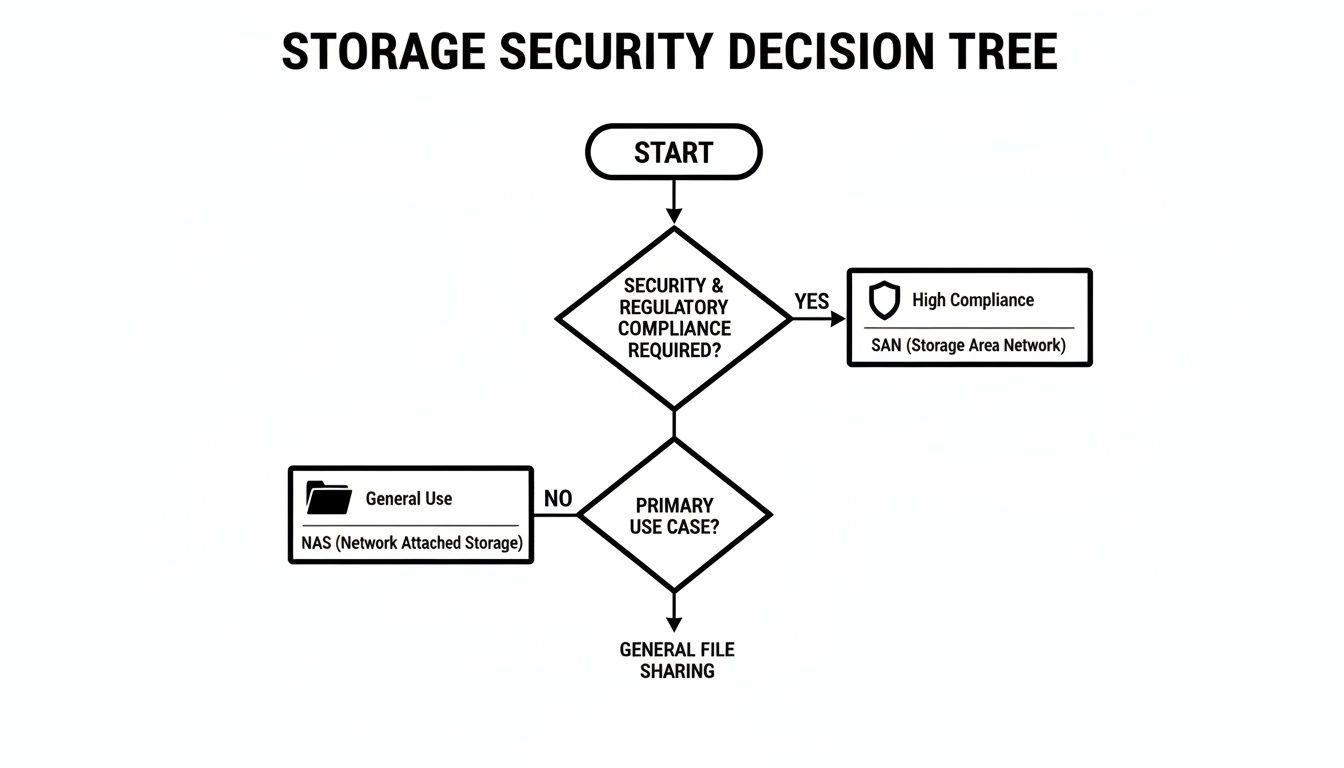
This illustrates why businesses in highly regulated industries often rely on a SAN’s inherent network isolation, whereas a properly secured NAS is sufficient for many general business needs.
Charting Your Storage Strategy
The optimal answer is rarely one or the other. Many businesses find that a hybrid approach works best, using a NAS for departmental file shares while dedicating a SAN to core business applications. This strategy allows you to align cost and performance precisely where they matter most.
Building a storage strategy that supports your business goals requires careful planning. A consultation with a trusted IT partner can provide an expert assessment of your environment, helping you build a reliable, secure, and scalable foundation. This ensures your IT infrastructure becomes a true asset for your company's growth. Learn more about how our managed IT services can help you make the right choice.
Frequently Asked Questions About NAS and SAN
When evaluating network attached storage vs. SAN solutions, several practical questions often arise for business leaders. Here are clear answers to some of the most common points of confusion.
Can a Business Use Both NAS and SAN Together?
Yes, absolutely. In fact, operating a hybrid storage environment is a common and highly effective strategy for many organizations.
The key is to leverage each system's strengths. A NAS is ideal for general file sharing, team collaboration, and data archiving. Meanwhile, the SAN is reserved for high-performance applications like databases and virtual server environments that cannot tolerate performance fluctuations. This approach optimizes both budget and performance by deploying the more expensive, complex SAN infrastructure only where its capabilities are truly needed.
How Does Cloud Storage Fit with NAS and SAN?
Cloud storage can either complement your on-premises NAS and SAN or, in some cases, replace their functions entirely. Many modern NAS devices include integrations with cloud services, enabling a hybrid cloud model for offsite backup and disaster recovery. This provides the speed of local access with the resilience of the cloud.
While public cloud services can handle many of the same workloads, on-premises hardware often delivers superior performance, tighter security control, and more predictable costs, especially for high-demand or sensitive data. The strategic decision is not about "local vs. cloud" but about determining which data and applications are best suited for each environment.
The most effective storage strategies do not force a choice between on-premises and cloud. Instead, they blend them to build a cohesive data management fabric that aligns with specific security, performance, and budget requirements.
Is a SAN Always More Expensive than a NAS?
Generally, yes. A SAN typically has a higher upfront cost due to the need for specialized hardware like Fibre Channel switches and Host Bus Adapters (HBAs), in addition to the specialized expertise required for its management.
However, an iSCSI SAN, which runs on standard Ethernet networks, can significantly reduce this initial investment. When analyzing total cost, it is critical to consider the business impact of performance bottlenecks or downtime. The higher cost of a SAN can deliver a substantial return on investment by ensuring your mission-critical, revenue-generating applications run smoothly and reliably.
Making the right infrastructure decision demands a clear view of your business goals and operational realities. Tricord I.T Solutions provides expert guidance to help you design a storage strategy that is secure, scalable, and perfectly aligned with your objectives. Contact us for a consultation.